
How Hard Is n8n to Learn? What I Learned Building Real Automations
Short answer: n8n is not especially difficult to start, but it has a real learning curve once workflows involve JSON, expressions, APIs, branching, retries, authentication, and error handling.
For a beginner, simple trigger-and-action workflows are approachable. The harder part is learning how data moves between steps and how to make the workflow reliable when something goes wrong.
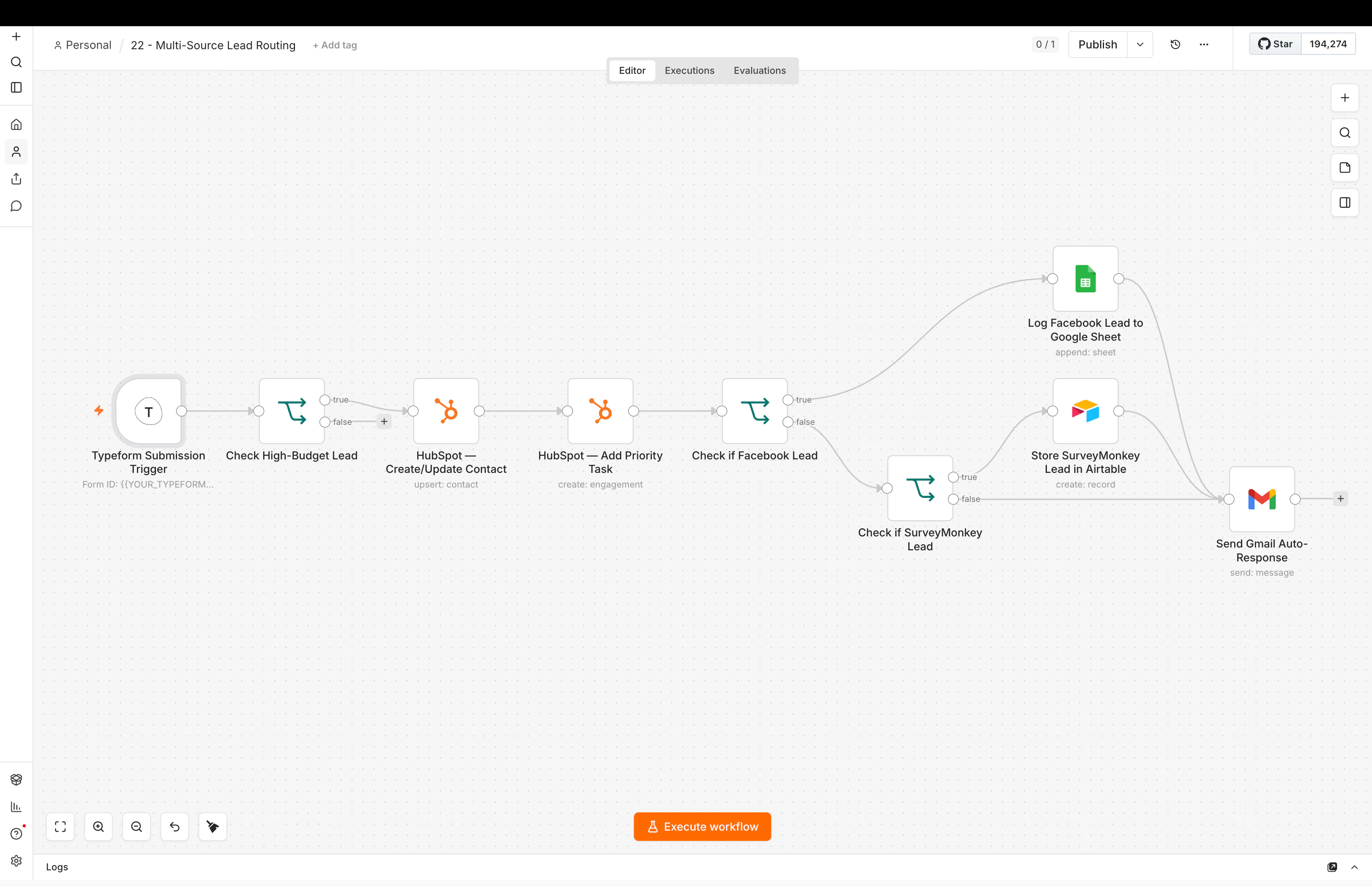
If you want to see what that looks like in practice, my n8n automation work includes real workflow examples across routing, CRM sync, onboarding, enrichment, AI, and reporting.
A lot of people open n8n for the first time and think:
This looks simple. Why does it feel hard?
I understand that feeling.
The boxes are easy to understand.
The hard part is everything between the boxes.
Where did the data come from?
What shape is the data in?
What happens if one field is missing?
What if the API fails?
What if the same lead enters twice?
What if the AI gives a strange answer?
That is the real learning curve.
Is n8n hard for beginners?
I would say this:
n8n is easy to start, but harder to use well.
You can build a small workflow very quickly.
For example:
Webhook → clean data → send Slack message
That is not too hard.
But a real business workflow may look more like this:
Lead form → normalize fields → check CRM → enrich company → qualify lead → route owner → update pipeline → send message → create follow-up → log result
Now the difficulty is not the n8n screen.
The difficulty is understanding the system.
That is an important difference.
The first thing I had to learn was workflow thinking
Before tools, I think in four parts:
Trigger → Data → Rules → Result
A trigger starts the workflow.
Data is the information moving through it.
Rules decide what should happen.
The result is what the business needs at the end.
For example:
Trigger: New website lead
Data: Name, email, service, company, message, source
Rules: Is the lead a fit? Who owns it? Is it already in the CRM?
Result: Clean CRM record, correct owner, clear next action
Once that is clear, n8n becomes much easier.
If the process is not clear, the workflow becomes messy very fast.
This is why I usually map the process before I build it.
Do you need coding for n8n?
No. You do not need coding experience to start with n8n.
n8n's current beginner learning path is built for people without prior coding experience. The useful technical skills come later: understanding data, JSON, APIs, credentials, expressions, and error handling.
You can do useful work in n8n without being a software developer.
But you do need to get comfortable with a few technical ideas.
JSON
Most APIs send data in JSON.
You do not need to memorize JSON.
You need to understand that data has names and values.
For example:
{
  "name": "Sam",
  "email": "sam@example.com",
  "service": "CRM automation"
}
If you can look at that and understand that service contains CRM automation, you are already moving in the right direction.
APIs
An API lets one system talk to another system.
You do not need to know every technical detail.
Start with four questions:
- What URL do I call?
- What information do I send?
- What information comes back?
- How does the system know I am allowed to use it?
That last part is usually authentication.
Once APIs stop feeling mysterious, n8n becomes much more powerful.
Expressions
Expressions let you use data from one step in another step.
This is where many beginners get stuck.
The good news is that you do not need to learn every expression at once.
Build small workflows and inspect the data after every step.
That habit matters more than trying to remember syntax.
Debugging is part of the job
This was one of the biggest lessons for me.
A workflow that works once is not finished.
Real workflows fail for boring reasons:
- a field is empty
- an API returns a different response
- a contact already exists
- a token expires
- a user enters strange data
- an app is temporarily down
- an AI step returns the wrong format
So I learned to ask:
What happens when this step fails?
That question changes how you build.
You start adding checks.
You add fallback paths.
You log important errors.
You make sure one bad record does not break the whole process.
This is also why I do not judge an automation only by how impressive the canvas looks.
I care more about whether it can be trusted.
AI makes n8n more useful, but also less predictable
AI is great when the input is messy.
For example, AI can help with:
- reading a long lead message
- classifying intent
- summarizing notes
- extracting useful fields
- drafting a reply
- choosing from a small set of categories
But I do not use AI for every decision.
If a normal rule can do the job, I usually prefer the rule.
For example:
If country = UK, send the lead to the UK team.
That does not need AI.
If the lead writes a long message and you need to understand which service they are asking for, AI may help.
I explain this more in when to use AI in an automation and when to use rules.
How long does n8n take to learn?
There is no honest single number.
You can learn the interface in a day.
You can build useful simple workflows in a few days.
But learning how to design reliable automations takes longer.
The fastest path is not watching more tutorials.
It is building small real workflows.
What should you learn before n8n?
You do not need to master programming before you start.
The most useful foundations are:
- how data moves between steps
- basic JSON
- what an API request and response look like
- credentials and authentication
- conditions and branching
- what should happen when a step fails
The official n8n learning path follows the same progression: start with workflows and data, then move into APIs, webhooks, AI, and reliability.
I would learn in this order:
- Triggers and basic nodes
- How data moves between nodes
- If conditions and branching
- HTTP requests and APIs
- JSON and field mapping
- Error handling
- CRM and database lookups
- AI steps
- Reusable workflow patterns
- Monitoring and maintenance
Do not try to learn all of n8n.
Learn the next thing your workflow needs.
What I would build first
Start with something boring.
That is good.
For example:
Form → Google Sheet → email alert
Then:
Form → CRM → assign owner → alert
Then:
Form → CRM lookup → qualification rule → owner → follow-up
Then add an API.
Then add an AI step.
This gives you a clean learning path.
You are not just collecting features.
You are learning how systems connect.
Is n8n worth learning?
If you only need very simple app-to-app automations, another tool may be faster.
That is fine.
I use the tool that fits the job.
My n8n vs Zapier comparison explains how I make that choice.
But if you want more control over APIs, data, branching, AI steps, and larger workflows, n8n is very useful.
You can also see the kinds of systems I build on my n8n automation work page.
The main lesson
The hard part of n8n is not learning where the buttons are.
The hard part is learning how a process works, how data moves, and what can go wrong.
Once you understand those things, the tool feels much simpler.
Do not try to become an n8n expert first. Pick one real process, map it clearly, and build the smallest workflow that solves it.
Further reading
People in the n8n community often ask whether the learning curve is worth it and why real workflows feel much harder than tutorials. These discussions are useful because they focus on APIs, JSON, debugging, planning, and real failure points rather than only the visual builder: